
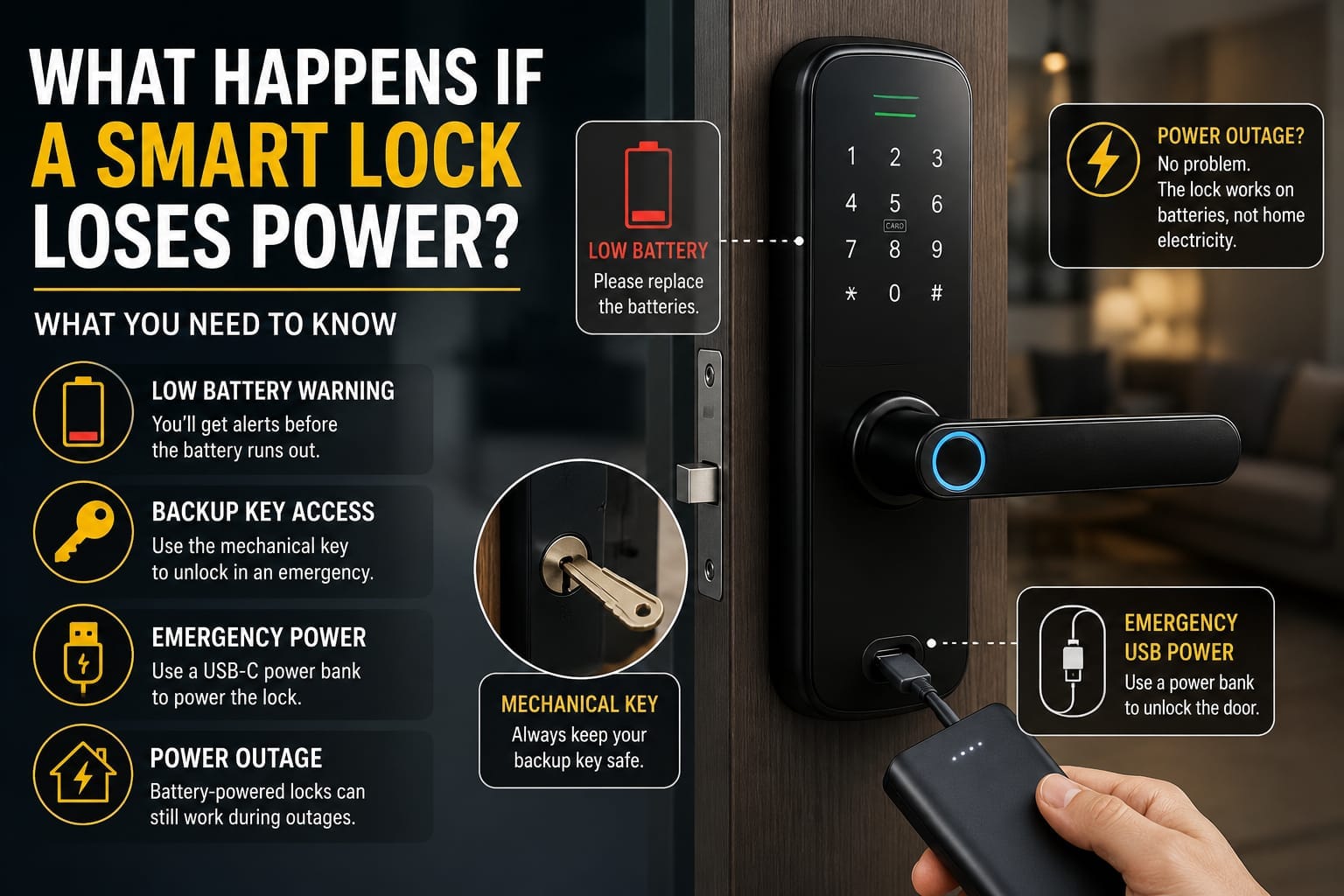
Do smart locks work without power? In most cases, yes. Smart locks can still provide access during a power outage because many models run on batteries and include backup access options.
What Happens If a Smart Lock Loses Power?
What happens if a smart lock loses power? This is a common concern for homeowners considering replacing a traditional door lock with a smart lock.
The good news is that losing battery power does not necessarily mean you will be locked out. Most modern smart locks provide low-battery warnings and one or more backup access methods.
Depending on the model, these may include a mechanical key, an external emergency power connection or other backup options.
In this guide, we explain what happens when a smart lock battery runs out and what you can do to regain access.
Do Smart Locks Work Without Power?
Most smart locks can continue to provide access without mains power because they operate on batteries. If the battery runs out completely, backup options such as a mechanical key or emergency power connection may still allow you to unlock the door.
Do Smart Locks Stop Working When the Battery Dies?
When a battery-powered smart lock completely loses power, electronic features such as fingerprint recognition, PIN entry, Wi-Fi connectivity or app control may stop working until power is restored.
However, many smart locks are designed with backup access options specifically for this situation.
The exact backup method depends on the lock model, so it is important to understand the emergency features of your smart lock before you need them.
Low-Battery Warnings Usually Come First
A smart lock normally does not lose power without warning.
Many models provide low-battery alerts well before the battery becomes completely flat. Depending on the lock, you may receive:
– A notification through the mobile app
– A low-battery message on the lock
– Flashing LED indicators
– Audible warning sounds
– Voice notifications
These warnings give you time to replace or recharge the batteries before the lock stops operating electronically.
Ignoring repeated low-battery warnings is one of the easiest ways to end up with an avoidable lockout.
Can You Use a Backup Key?
Many smart locks include a mechanical backup key.
The key cylinder may be clearly visible or concealed behind a cover depending on the design of the lock.
If the batteries are completely flat, the mechanical key can usually operate independently of the electronic system.
For this reason, if your smart lock includes an emergency key, keep it somewhere safe and accessible rather than leaving it inside the locked property.
Emergency USB Power
Some modern smart locks include an emergency external power port.
Depending on the model, this may be USB-C or another type of emergency power connection.
If the internal battery is flat, temporary external power can allow the keypad, fingerprint reader or other electronic unlocking method to operate again.
This does not necessarily recharge the lock’s internal batteries. Its main purpose is to provide enough temporary power to unlock the door.
After gaining access, the batteries should be replaced or recharged as required by the manufacturer.
What Happens to Wi-Fi and App Control?
If the smart lock itself has no power, electronic communication features will normally stop operating.
This can affect:
– Remote unlocking
– Mobile app control
– Wi-Fi connectivity
– Bluetooth functions
– Access notifications
– Activity records
– Some smart home automations
Once power is restored, compatible functions should become available again according to the lock’s design and connectivity.
Will a Power Outage Stop a Smart Lock Working?
Not necessarily.
Many residential smart locks operate using internal batteries, so a household electricity outage does not automatically mean the lock will stop working.
A battery-powered smart lock can generally continue operating while the house has no mains power, provided its batteries still have sufficient charge.
However, internet-dependent functions may be affected if your modem, router or smart home hub loses power.
For example, you may temporarily lose remote access or mobile notifications while still being able to unlock the door locally using a fingerprint, PIN, card or other supported method.
How to Avoid Getting Locked Out
A few simple precautions can significantly reduce the risk of problems:
– Replace batteries when the first low-battery warning appears.
– Use the battery type recommended by the manufacturer.
– Keep the emergency mechanical key in a safe location.
– Learn how the emergency power connection works.
– Check battery levels periodically through the lock or mobile app where supported.
– Avoid waiting until the battery is completely flat before replacing it.
It is also worth checking the emergency access features before buying a smart lock.
Two locks may offer similar fingerprint, PIN and app functions but have very different backup options.
Choosing a Smart Lock With Good Backup Options
When comparing smart locks, do not focus only on fingerprint recognition, cameras, mobile apps or appearance.
Emergency access is equally important.
A well-designed smart lock should provide clear low-battery warnings and a practical method of entering the property if its battery becomes completely flat.
Features worth considering include:
– Mechanical emergency key
– External emergency power connection
– Clear low-battery alerts
– Reliable battery monitoring
– Multiple unlocking methods
These features can make a significant difference during an unexpected battery failure.
Smart Lock Installation in Melbourne
Correct installation is also important for reliable smart lock operation.
A poorly aligned door or lock mechanism can create additional resistance and may affect the way the motor operates.
Techno Trading supplies smart lock solutions for homes and businesses in Melbourne, with different options including fingerprint access, PIN codes, cards, mobile connectivity and other smart features depending on the model.
When choosing a smart lock, consider your door type, required access methods, connectivity and emergency backup options.
Conclusion
So, what happens if a smart lock loses power?
Electronic functions may temporarily stop working, but many modern smart locks provide backup methods such as a mechanical key or an emergency external power connection.
Battery-powered smart locks can also continue operating during a household power outage as long as their own batteries have sufficient charge.
The best approach is simple: pay attention to low-battery warnings, understand your lock’s emergency access method and replace or recharge the batteries before they become completely flat.
FAQ
Can a smart lock work when the power is out?
Yes. Many smart locks use internal batteries and can continue working during a household power outage. Internet-based features may be unavailable if your router or hub also loses power.
Can I unlock a smart lock with a dead battery?
Depending on the model, you may be able to use a mechanical backup key or provide temporary power through an external emergency power port.
Does a smart lock need electricity from the house?
Many residential smart locks are battery-powered and do not require continuous mains electricity. Requirements vary by model.
What should I do when my smart lock shows a low-battery warning?
Replace or recharge the batteries as soon as possible using the battery type and procedure recommended for your lock.
Will my fingerprint still work if the smart lock battery is completely dead?
Usually not until power is restored, because the fingerprint reader requires electrical power. An emergency power connection or mechanical backup key may provide an alternative, depending on the model.
For more information about smart lock security and connected devices, you can read guidance from the Australian Cyber Security Centre.